


X- which we will still refer to as Twitter in this post, is one of the biggest and most viral social networks in the world. Two hundred and eighty characters are enough to share an opinion, draw a smile, or even start a war.
But there's one more option that helps you express yourself beyond the word count. It's adding an image. A picture is worth a thousand words, after all.
If you are an active user, let us show you this image size cheat sheet for Twitter social media images. This is a complete guide for all image sizes on Twitter.
Graphic Optimal Image Size Maximum File Size Profile Banner 1500 x 500 pixels 5MB Profile Photo 400 x 400 pixels 2MB Image Post 1600 x 900 pixels 15MBKeep in mind that images are displayed on the web in the sRGB color space.
Adding a Twitter static image to the social network Twitter is not as easy as it sounds. Twitter, like all major social media platforms, offers guidelines regarding file types, maximum file sizes you can add, acceptable formats, and so on.
Unlike some other social media networks, Twitter is complicated when it comes to images. So, if you’ve tried to comply with the social media sizes of Twitter and still received a message from Twitter to optimize your images, you are not alone.
Getting the correct sizes and image dimensions for a specific social media network may be challenging at times. And let’s not forget that you must keep in mind how your Twitter banner will scale across various devices and screen resolutions.
In the following Twitter size guide, we will go through the correct dimensions for your designs and image size requirements.
Besides the common Twitter banner size, you will also learn how to design cool multiple-photo posts. We will also guide you on getting the right dimension for the newest Twitter feature: Twitter Fleets.

What is the perfect Twitter banner size?
Let’s start at the top of your profile. The Twitter header image is the first thing your profile visitors will see. That's why it's important to make a header that reflects not only your brand but is also in line with what you tweet about.
Pro tips:
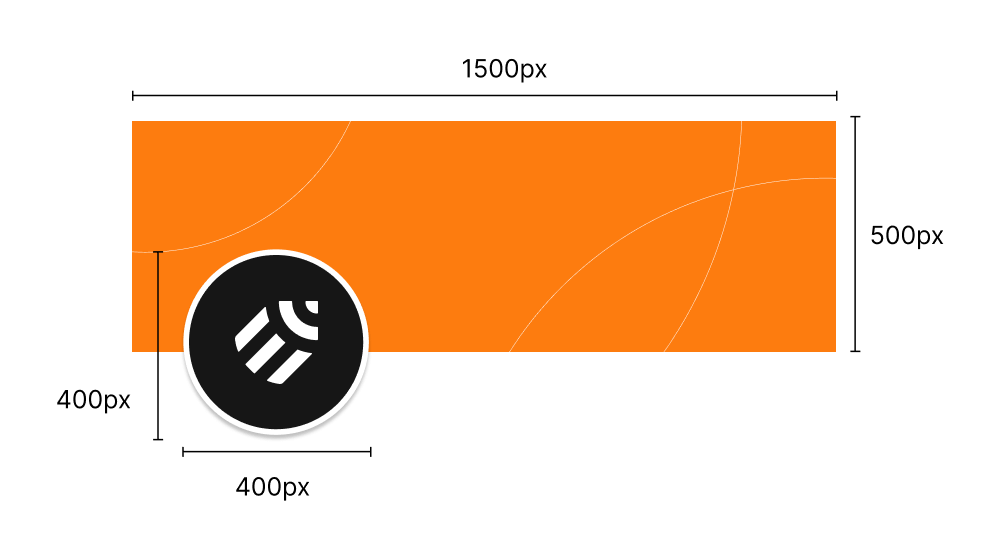
- When trying to get the perfect Twitter banner or header size, keep in mind that your profile photo will cover up the lower-left corner of your banner. The best thing to do is to leave this particular banner corner blank. This way, you will prevent design elements from being “hidden” behind your profile thumbnail.
- Another thing to keep in mind is how the Twitter cover photo will look on different devices such as mobile devices or other tablets. You want the Twitter header design to look great, no matter the screen size or screen resolution.
- As mentioned earlier, try to add a banner that reflects your brand or your business. This is particularly important for businesses and business owners, or anyone using Twitter to generate leads or build their online presence.
Twitter banner recommended dimensions
In its early stages, Twitter allowed users to crop their Twitter header in many different ways. Well, not anymore.
3:1 aspect ratio 1500 pixels wide x 500 pixels tall 5MB
Regarding the format you can use: JPG, PNG, and GIF formats are the way to go. Unfortunately, at the moment, Twitter does not allow you to use animated GIFs on your banner.
If you want to get the dimensions right and save time, use Linearity’s simple templates.
With Linearity Curve, for instance, you can create an awesome Twitter header with just a few simple steps. The Unsplash integration will also allow you to find great backgrounds for your Twitter account.

Twitter profile photo size
Every time you tweet or simply reply to a tweet, your profile photo or company profile picture will be displayed next to your name. So, a great Twitter profile picture might bring even more followers to your profile. Use it as a creative element.
If they like what you are tweeting about, the next step they will take is hovering over your photo thumbnail. This will allow them to check out your Twitter bio without clicking on your profile.
That is why you must pay attention to your Twitter profile image and what you write in your bio. You even have to consider the company logo size.
Twitter profile photo recommended dimensions
Since 2017, Twitter profile pictures have switched from square to round shapes. Twitter uses a circular mask on images, meaning the square photo avatar you use for your profile picture should follow a 1:1 aspect ratio.
The recommended correct size dimensions for the perfect square images of the Twitter profile pictures are 400 pixels wide x 400 pixels tall. The profile picture size and file type are also crucial. The maximum size of the file should be 2MB.
Similar to the header photo, the permitted formats for your profile picture are JPG, PNG, and GIF.
Pro tips:
Use the same profile picture
We recommend using the same profile picture across all social media accounts you may have. This will ensure that your profile will be easily recognizable across all platforms.
Being consistent with the image you use on your profile picture will improve your brand recognition. If you already have a cool photo or brand image on your YouTube channel, you can reuse it here since Twitter also has a round thumbnail icon.
This tip is not as relevant for the banner image as you can use different banner images for various channels, depending on the different purposes of each channel.
Show your beautiful smiling face
Unless you represent a business, we would not recommend using logos or quotes in your profile photo. A full-face photo with a clear or simple background will add that human touch and bring you closer to your audience.
Select different screen sizes
Select a profile photo that works well on various screen resolutions, screen sizes, and devices. If you want to add a logo to your profile photo, use the thumbnail previews to make sure no branding elements are cropped out.
You can also use the preset template in Linearity Curve to get your Twitter image size just right. No need to start everything from scratch. Use Linearity Curve to easily design your profile photo and save precious time, which you can use to make your graphic elements even more unique.
Twitter image post size
After covering the optimal banner size and profile photo for your Twitter page, it’s time to talk about how to post correctly sized images with the correct Twitter image size for tweets.
Even though Twitter doubled its character count from 140 to 280, this new character limit might not be enough to communicate what you have to say or show.
That’s when attaching images to your Tweets becomes the perfect solution to convey more information or simply share something you have been working on via several photos.
Recommended dimensions
First things first: 2:1 is no longer the correct image aspect ratio for your Twitter news feed. The right aspect ratio is now 16:9. The minimum size is 600 pixels wide x 335 pixels tall. For larger images, the ideal image size is 1200 pixels wide x 675 pixels tall.
If you post the photos directly from Twitter, the maximum file size allowed is 15MB. Keep in mind that BMP or TIFF files are not allowed. Only PNG, JPEG, and GIF formats are permitted at the moment.
Pro tips:
Use a private Twitter account to test
We would recommend using a private Twitter account to test out the images you use for your tweets before publishing them for the world to see. It might seem like adding a bit of extra effort, but it will be worth it in the end.
Test on various screen sizes
Use the private account on various devices to check how the images will show on multiple screen resolutions as well. Use the correct image type as well.
Check the crop
Twitter may “crop” some parts of the images when you add multiple images simultaneously. So make sure you include essential visual elements and content in the center of the photos, so they won't get “left out” when included in a multiple photo grid.
Check aspect ratios when uploading more than one image
When you upload more than one image, the image content will be stacked differently and appear with different aspect ratios.
- When you tweet two images, they will be stacked side by side. Both will have a 7:8 aspect ratio.
- When you tweet three images, one of the images will appear larger than the other two and have an aspect ratio of 7:8. The other two will be stacked side by side and appear in a 4:7 aspect ratio.
- When you tweet four images, which is the maximum number of photos Twitter allows you to post at the same time, the four images will be arranged in a 2 x 2 grid. Each of the photos will appear in a 2:1 aspect ratio.
As promised earlier, here is a fun and creative way to use four images simultaneously. As shown above, you can create funny memes using multiple photo posts.
Achieving such results on the first try will take some practice since you need to understand how Twitter crops the photos. One easy way to do this is to use Linearity (formerly Vectornator)’s integrated templates to design your next tweetable image.
Recommended Twitter ads dimensions
To maintain a brand's visual continuity, companies, and Twitter users may have to post different types of content. They might also need to use various Twitter features such as Twitter cards and Twitter Moments.
Sometimes, you may also need to use Twitter Ads to achieve your marketing goals. This is where it gets tricky.
Recommended dimensions for visual content used on ads differ from what we discussed above. And it also varies for different types of ads.) you want to run, such as standalone image ads, video ads, carousel ads, and so on.
Twitter recommends using a minimum width of 600 pixels for standalone image ads. It does not limit you in terms of height. However, Twitter will crop the image to achieve a 1:1 aspect ratio if the height exceeds the width. The maximum file size allowed is 3MB.
Ready to pull off the perfect Twitter profile?Now that you know how to use the correct sizes for your Twitter profile with our image size guide, we encourage you to start designing your profile and tweet your design to us @LinearityHQ. Don't choose a generic image, create one yourself.If you want to have an easy start and skip the manual creation of templates, you can simply use the built-in Twitter templates in our graphic design software Linearity. Then, easily export from Linearity right in the PNG format that Twitter needs.You don't need to be an expert with complicated design tools to pull off the perfect Twitter profile. You shouldn't worry about having a blank canvas, either.With Linearity's templates, Unsplash free stock photo library, and search engine, you'll always have plenty of graphic elements to kick off your design. All in one editing tool.
Key takeaways
Navigating the realm of social media image sizes can seem daunting since each platform, from Instagram Stories to Twitter Cards, has unique requirements that significantly influence the impact of visual content.
These nuances in image sizes and aspect ratios are not just technicalities; they play a pivotal role in a brand's marketing strategy, capturing the ever-diminishing attention span of audiences.
For blog posts and social platforms, thumbnail image sizes and cover images are equally crucial. A compelling cover image on a personal profile or a business page, adhering to the platform's cover image size guidelines, sets the tone for the viewer's experience.
When it comes to digital advertising, sizes for ads vary. An ad designed for Facebook might not fit the aesthetic or dimensions required for an Instagram feed. App card images and card image sizes for promotional content need to be tailored to specific dimensions to ensure optimal display and audience engagement.
Similarly, the types of images used, be it for a product display or a company event, must align with the brand's messaging and ethos.
Content creators, illustrators, and graphic designers need to be particularly mindful of the maximum image size and the file size limit imposed by social platforms.
The right social media post sizes can mean the difference between content that resonates and engages and content that is easily overlooked.